CHEQ BY CANTALOUPE · 2024–2026 · PRODUCT MANAGER
Enterprise 2.0
Business Settings Revamp
From a flat Partner Web App to a scalable Venue–Revenue Center configuration model.
Add: Partner Web App overview or venue settings screenshot
/images/cheq/product-1.jpg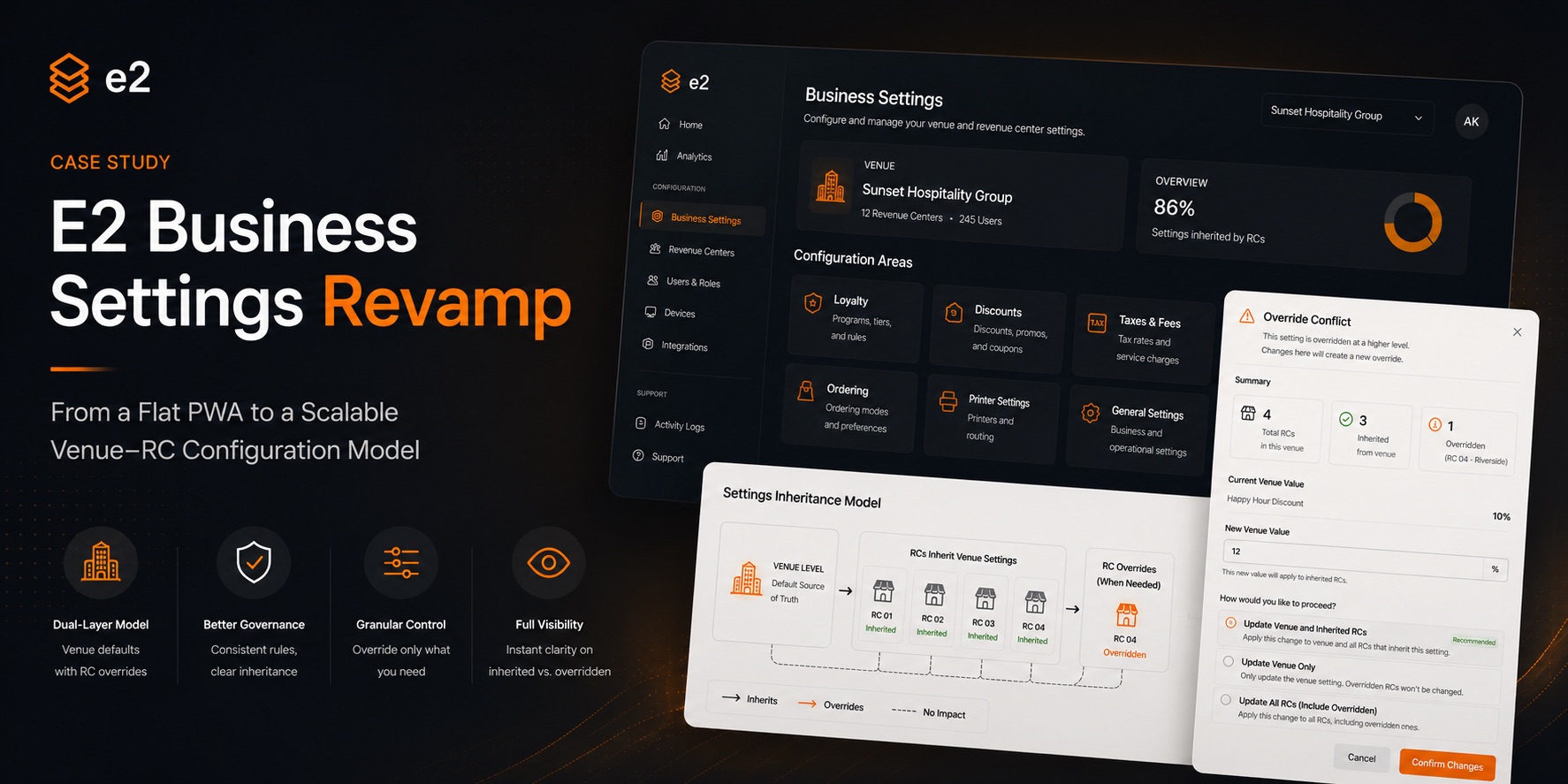
EXECUTIVE SUMMARY
“What looked like a navigation redesign was really a question about where truth should live in the product.”
This started as a navigation redesign of the Partner Web App — the admin surface that CHEQ partners use to configure how their business runs. It quietly became a product-architecture problem.
The old experience was flat, hard to navigate, and conceptually wrong. Most configuration lived at the Revenue Center (RC) level even when it logically belonged to the whole venue. For multi-location partners, that meant the same values re-entered across every location, no shared source of truth, and no way to govern a venue as a whole.
The new direction: a dual-layer model — Venue as the default source of truth, RC as a controlled extension where local overrides are allowed when genuinely warranted. This was never about the UI. It was about the logic underneath: what belongs at Venue, what belongs at RC, when to inherit, when to diverge, and how to make all of that legible to the people who use it every day.
The Starting Point
Two problems that fed each other.
PROBLEM 01 — NAVIGATIONAL
Flat, outdated information architecture
Tabs and left-hand nav items with no clear hierarchy or scope. The interface never told you whether a setting affected the entire venue or just one Revenue Center. Partners consistently raised the same concern: making a change without knowing what else it would affect. When users can't predict the scope of their own actions, trust erodes fast.
PROBLEM 02 — CONCEPTUAL
Configuration only existed at RC level
Even when a venue-wide default was the obvious choice, the model forced everything into the RC layer. For multi-location partners, this meant repetition — the same values re-entered across every location with no shared source of truth. The product wasn't just hard to use. It was modelling the business incorrectly.
“This wasn't a screens problem. It was a model problem.”
The Core Insight
One rule, applied consistently everywhere.
Venue = default source of truth
Revenue Center = controlled extension — inherits unless it has reason to diverge
“Inherit by default. Override by exception.”
One consistent set of inheritance-and-override rules applied across all seven settings areas — not different logic per page. This made the project bigger in concept but cleaner in execution: easier for engineering, QA, and Customer Success to reason about, because the rule never changed.
TWO-LAYER CONFIGURATION MODEL
VENUE LAYER
Venue Settings
Default source of truth
RC LAYER
RC 01
inherits venue
RC LAYER
RC 02
inherits venue
RC LAYER
RC 03
local override
RC LAYER
RC 04
inherits venue
RC 03 has diverged from the Venue default — the override is explicit, visible, and reversible.
7 SETTINGS AREAS COVERED
Rewards
Programs, tiers, earning rules
Pricing
Rules, codes, assignment
Tax Config
Rates, item-level mapping
Hardware
Device config per RC
Menu & Orders
Flow, availability, display
General
Venue-wide preferences
Brand & Profile
Identity, display name
Reframing the Work
Architecture, not screens.
The work was planned around product areas rather than old screens. This meant a master epic for the full settings revamp, section-level tickets per area, a detailed product spec capturing the rules and their context, and a UAT framework for QA and Customer Success to test against.
The goal was to avoid one monolithic ticket. Each section could be phased by engineering, tested in isolation, and explained to partners independently. The spec wasn't just requirements — it was the shared mental model that kept the team aligned when edge cases surfaced.
BEFORE — FLAT MODEL
PARTNER WEB APP
No concept of Venue vs. RC. Everything lives at RC level — even settings that logically belong to the whole venue.
AFTER — SCOPED MODEL
VENUE SETTINGS
REVENUE CENTER SETTINGS
Scope is always visible. Users always know where they are and what changes will affect.
Add: Settings page showing venue/RC scope distinction
/images/cheq/product-2.jpg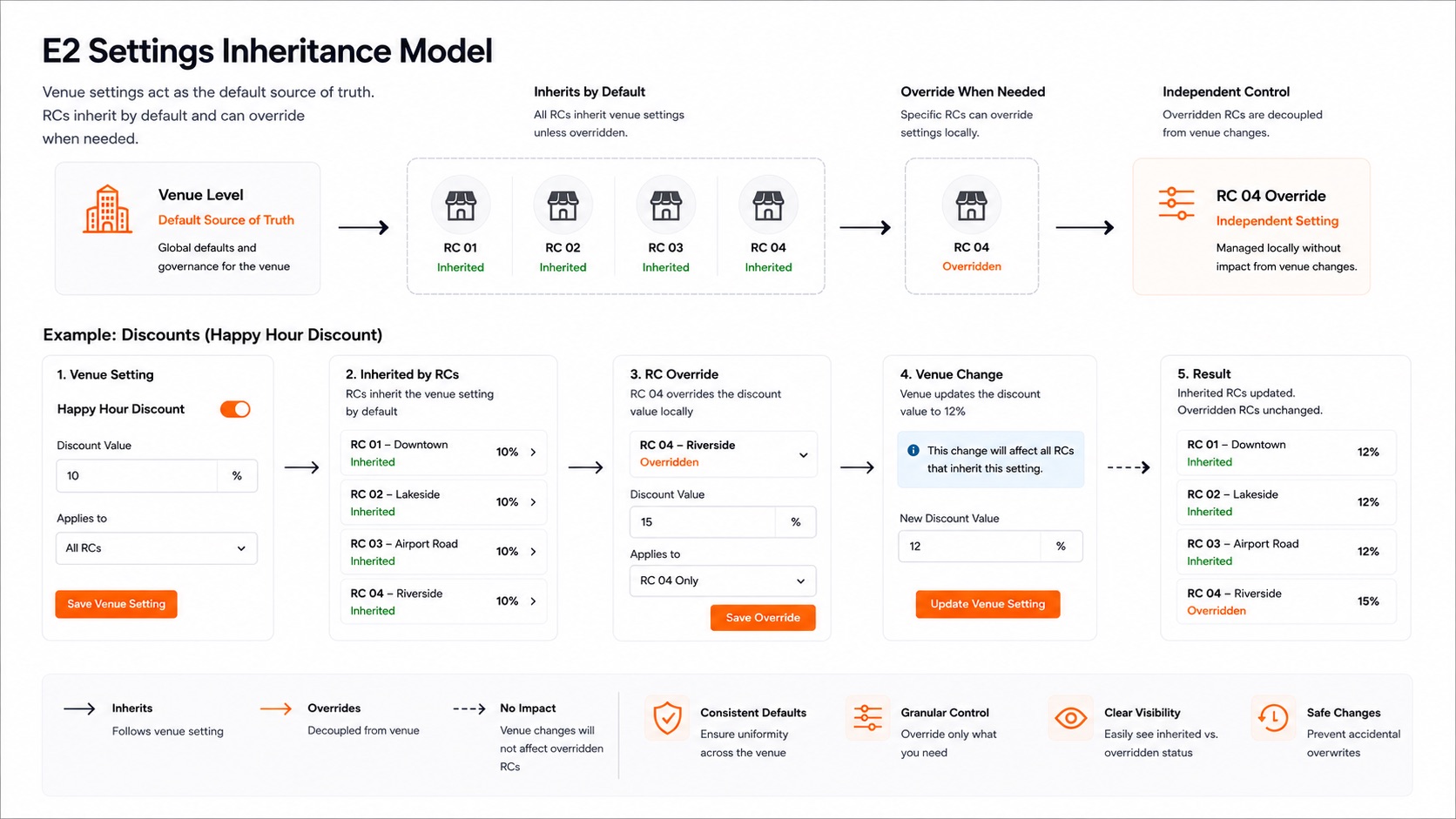
The Hard Parts
An honest account of where the model broke — and how it got fixed.
The first model was too simple
The early model treated several RC pages as read-only, assuming a single shared config per venue would cover all cases. Wrong. Different RCs under the same venue can legitimately need different configurations, down to field level. The RC layer had to become editable too. A correction that was uncomfortable to make — because it meant reworking work already done — but one that mattered far more than the sunk cost of avoiding it.
Assignment and toggles were entangled
In certain settings areas, assigning Revenue Centers and enabling/disabling a feature were too tightly coupled. A setting someone had deliberately disabled could silently switch back on during a bulk assignment operation. In a large venue operation, that's a real-money mistake. The fix: decouple assignment (which RCs have access) from activation state (whether it's currently on). Removing a whole category of 'why did this turn back on?' support tickets before they could exist.
The override problem — the heart of it
What happens to Venue-level changes when some RCs have already diverged? A naive model lets the Venue set a default, an RC overrides locally, and then the Venue stops touching it — clean but it traps the admin with no path back. The solution: a conflict-aware flow. If all RCs still match the Venue, the simple path applies. If some RCs have diverged, surface a warning and let the admin decide scope explicitly. One modal, clear scope options, no destructive action without an informed choice.
OVERRIDE CONFLICT FLOW
SIMPLE PATH
Venue change saved
↓
All RCs still match Venue
↓
Applied across all RCs
CONFLICT-AWARE PATH
Venue change saved
↓
Some RCs have diverged
↓
⚠ Conflict modal surfaced
↓
Admin chooses scope explicitly
No destructive action without an informed, deliberate choice. Complexity surfaced — not hidden.
ON COLLABORATION
Almost every improvement came from back-and-forth with engineers and designers surfacing edge cases: whether RC overrides persist after a Venue change, what “modified” actually means, whether reassigning resets state, what happens when a service charge is deleted, whether an RC should see-but-not-edit a field. That surfacing-and-resolving loop is the actual job — not a detour from it.
How It Came Together
Navigation, scope clarity, and propagation rules — all serving the same model.
NAVIGATION REBUILT AROUND THE MODEL
Separate navigation scopes for Venue Settings and Revenue Center Settings. RC switching in the top-right profile menu. Visible scope cues in the left navigation — users always know where they are and at what level they're working before they touch anything.
SCOPE CLARITY PRINCIPLE IN FIELDS
Not editable at RC
View-only (not hidden)
Users see what exists, understand why they can't change it
Editable at both levels
UI says so explicitly
No ambiguity about where a change will land
System-controlled
Locked with explanation
Why it's locked matters as much as the lock itself
PROPAGATION RULES (EXPLICIT, NOT ASSUMED)
Add: Override conflict modal, navigation scope, or propagation rules screenshot (optional)
/images/cheq/product-3.jpg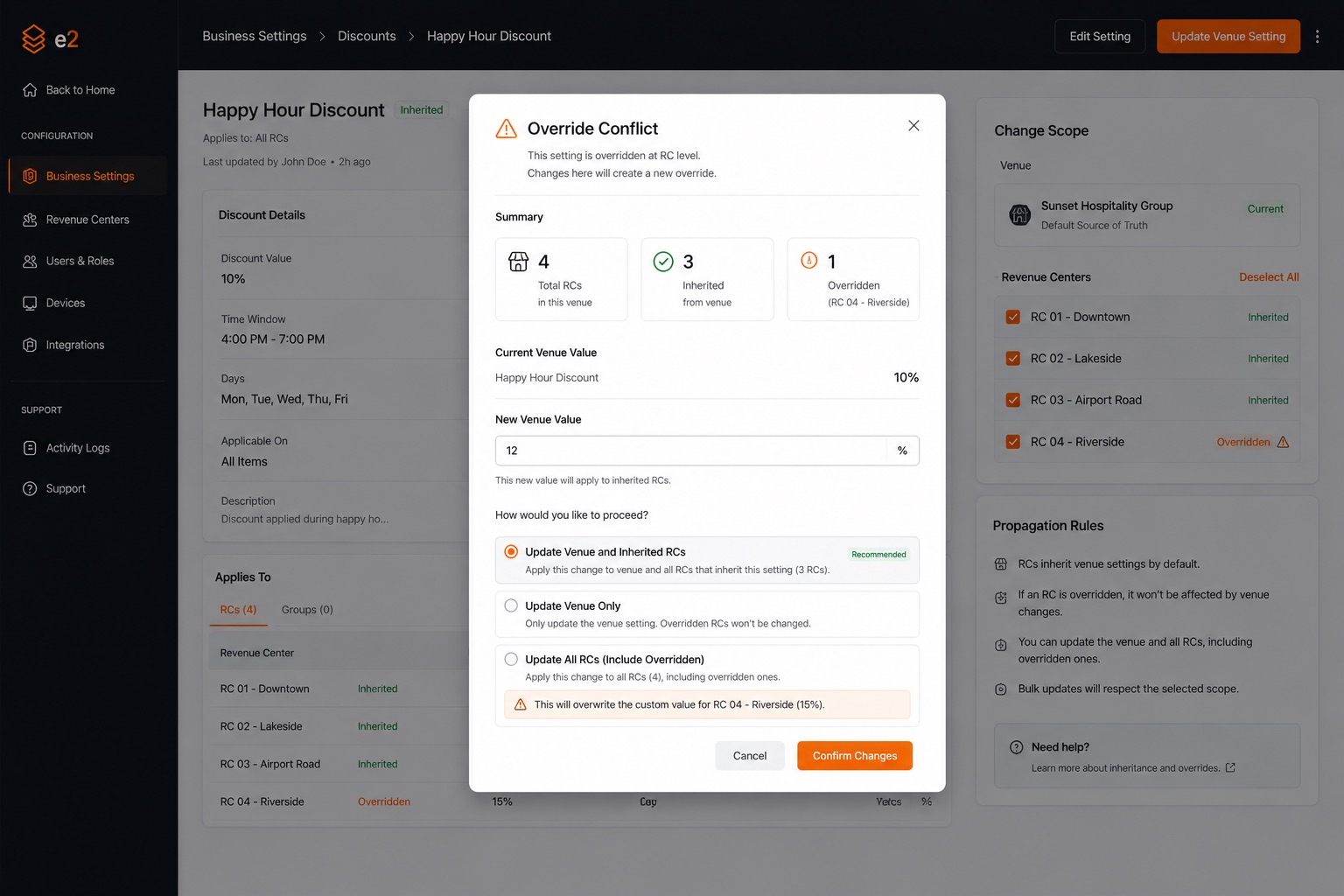
What This Work Taught Me
Product hierarchy must be visible in UI hierarchy
If the model says 'Venue, then RC,' the interface must say it too. A mismatch between data model and navigation model isn't a design inconsistency — it's a conceptual lie the product tells every time someone uses it.
Assignment logic should never quietly mutate activation state
Coupling two distinct operations — which things exist, and which things are currently on — creates a class of bugs that look random but are fully deterministic. They only appear in edge cases, which is exactly when trust matters most.
Overrides need explicit rules — ambiguity makes them impossible to reason about
Without a documented propagation model, every engineer, QA engineer, and Customer Success rep will make a different assumption. The spec isn't overhead; it's the only way to keep the system coherent across people and time.
Read-only is not enough — people need to understand why
Locking a field without explaining why isn't scope clarity, it's a wall. The same real estate that shows the restriction should explain its reason. Users who understand the system trust it. Users who encounter walls without context call support.
One good rule is worth more than a hundred ad-hoc exceptions
★The inheritance model's power came from its consistency. Once you knew 'Venue is default, RC can override,' you could predict the behaviour of any field on any page. That predictability was the product. The settings themselves were just content inside it.
Predictability, not minimalism, is what earns trust in enterprise software
★Enterprise users don't need fewer options — they need to trust that the options they use will behave the same way every time. Simplicity without predictability is just less functionality. Predictability without simplicity is complexity people can still rely on.
Get the architecture honest, and the experience tends to follow
Every navigation decision, every modal, every field state in this project was downstream of the two-layer model. When the model was clear, design decisions were straightforward. When the model was ambiguous, every design decision was hard. Honest architecture is the real leverage point.
Why It Matters
This wasn't about redesigning screens. It was about giving a multi-location platform a mature way to govern itself: Venue manages defaults, RCs manage local behaviour where genuinely needed, system-controlled values stay protected, and conflicting changes are surfaced on purpose — not discovered by accident.
OPERATIONAL IMPACT
The same inheritance model that makes the UI legible makes managing a large fleet of devices tractable. Values set once at Venue, inherited by default across all locations — consistent configuration, less overhead, fewer misconfiguration support tickets.
USER IMPACT
Partners get more control without losing clarity. Floor staff and customers interact with devices configured through a system that's finally honest about what belongs where — and when something unusual is happening.
“Get the architecture honest, and the experience tends to follow.”